Reinforcement Learning for Design Taste
Models have gotten remarkably good in technical domains such as math and coding. Many software engineers today would admit that LLMs now write better code than they could by hand. However, we haven’t yet seen the same capability jump in creative domains like design.
A large part of this is due to limitations in how models are trained. Reinforcement learning works best when there’s an objective way to check a result. Math problems have an exact answer; coding tasks have test suites. Design, like writing or other subjective domains, has nothing like that. This makes them an awkward fit for RL.
The standard workaround is to use an LLM as a judge: show a model a design, ask it how good it is, and turn that score into a reward. In practice, this doesn’t work that well. Models are good at spotting designs that are obviously bad or break from a design brief, but they tend to be poor arbiters of taste — or, at least, of taste that matches our own.
In this post, we test this by training Qwen3.8-27B on a set of webdev RL environments. To measure the effect of judge taste, we train two versions of the model using different judges and explore how each one shapes the model’s final design taste.
The environments
We train using a subset of the RL environments Xiaomi open-sourced alongside MiMo-V2.6. The release includes 7,780 agentic environments, 2,093 of which are webdev tasks. These are essentially RL environments for design.
You can dig through a few of the tasks below. For a more detailed view, or to see all tasks, check out the explorer here.
MiMo webdev tasks
Design a static Tailwind landing page for a moving company, art-deco style like a polished Dribbble shot, with smooth infinite-scroll sections, hero, services, pricing cards, testimonials, packing tips and contact CTA using only mock content.
sveltekit static food blog docs, neumorphic, instagram vibe
请用 React 做一个纯静态的 SaaS 风格咖啡店品牌编辑类官网,主题是给独立咖啡馆使用的订阅式运营工具介绍页,不需要后端、登录、数据库或任何真实 API,所有数据用 mock 文案即可。整体视觉要干净、现代,有一点 Spotify 那种深色高级感和大色块排版,但不要照抄;页面包含 hero、产品理念、咖啡店运营痛点、功能卡片、客户故事、价格简表、编辑文章精选和 footer。请加一个明暗模式切换按钮,切换后背景、卡片、文字和强调色都要协调。技术上希望组件拆分清晰,CSS 可以用普通 CSS 或 Tailwind,重点是静态可渲染、响应式、简单交互流畅,不要做地图、实时数据、支付、账号系统或复杂动画。
Create a simple static Nuxt website for a cyberpunk coworking-space restaurant called Neon Desk Cafe. Style inspired by YouTube layout: left sidebar nav, top search bar, card grid, bold thumbnails/cards, but make it original not a clone. Pages/sections: Hero with tagline “Work, Eat, Connect After Dark”, featured menu cards, coworking zones, community forum-style discussion preview, events strip, pricing for day passes, testimonials, and footer. Main interaction: search/filter bar that filters static sample posts/menu items on the page (no backend). Design: dark neon background, magenta/cyan glow, glass cards, futuristic typography, responsive mobile layout. Use only mock/static content and local placeholder images/icons. No login, no API, no database, no checkout, just a polished static front-end restaurant/coworking marketing site.
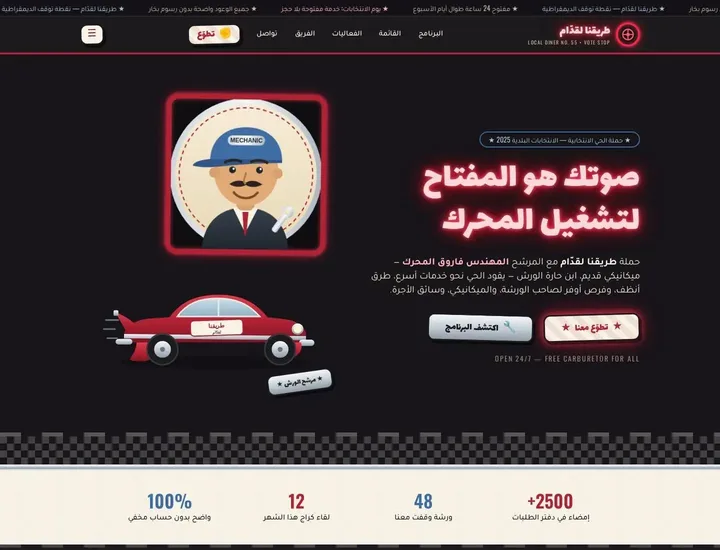
أريد منك بناء موقع ثابت كامل بواجهة أمامية فقط لحملة انتخابية محلية اسمها تقريباً "طريقنا لقدّام"، الحملة مرشحها يركز على قطاع السيارات والميكانيكيين وسائقي الأجرة وأصحاب الورش، لكن أريد شكل الموقع كأنه مطعم/داينر أمريكي قديم على طريق سريع في الخمسينات مع لمسة سياسية واضحة: لوحات نيون، كروت قائمة طعام، أزرار مثل ملصقات صدام السيارات، ألوان retro مثل الأحمر الكرزي، الكريمي، الأزرق الباهت، الأسود، ولمسات كروم. استخدم الشعار والصور المرفقة كما هي لو وجدت، خصوصاً صورة المرشح وصورة السيارة القديمة، ولا تعيد تصميم الشعار، فقط نظّفه بصرياً داخل الهيدر. المطلوب موقع بسيط static فقط بدون باكند وبدون API وبدون تسجيل دخول وبدون قاعدة بيانات؛ أي أرقام أو شهادات أو مواعيد تكون محتوى وهمي/ثابت قابل للتعديل من داخل الملفات. أريده Vanilla HTML/CSS/JS فقط، منظم وجاهز للرفع على Vercel كـ static site. الصفحة الرئيسية تكون landing page بأسلوب مطعم سياسي: hero كبير بعنوان قوي مثل "صوتك هو المفتاح لتشغيل المحرك"، زر CTA للتطوع وزر آخر لمعرفة البرنامج، شريط علوي بسيط فيه الشعار وروابط: البرنامج، القائمة، الفعاليات، الفريق، تواصل. بدل قائمة الطعام اعمل قسم "قائمة الوعود" على شكل menu board وفيها بنود مثل دعم الورش الصغيرة، تدريب الشباب على صيانة السيارات الكهربائية، تحسين مواقف النقل، تخفيض رسوم تراخيص المشاريع الصغيرة، وسلامة الطرق. أضف قسم يشبه بطاقة restaurant specials بعنوان "عروض الحملة هذا الأسبوع" لكنه سياسي، مع 3 بطاقات فعاليات ثابتة: لقاء في كراج شعبي، إفطار مع سائقي التاكسي، جولة في سوق قطع الغيار. أريد كذلك قسم testimonials على شكل إيصالات مطعم أو tickets قصيرة من ناخبين وهميين، وقسم مقارنة لطيف "قبل / بعد" بأسلوب عدادات سيارة يشرح مشاكل الحي والحلول. لازم يكون التصميم responsive وموبايل أولاً، مع حركة خفيفة جداً في الأزرار والنيون باستخدام CSS فقط، لا تستخدم canvas ولا 3D ولا WebGL. اجعل الكود نظيف، التعليقات قليلة، أسماء الأقسام واضحة، واهتم أن الموقع يبدو فعلاً كحملة سياسية Automotive لكن داخل قالب restaurant/diner retro، ليس موقع شركة سيارات عادي. أضف footer فيه عبارة قانو
Build a static Next.js documentation/blog website for a logistics intelligence platform. I want a clean Swiss-style layout with strong typography, lots of white space, grid-based article cards, and a sticky top navigation that stays visible while scrolling. The site should feel like a polished editorial knowledge hub with sections for featured posts, shipping guides, route optimization notes, warehouse operations, and industry updates. Use mock/static content only, no backend or APIs. Take inspiration from Twitter’s compact information density and quick-scan feed style, but make it more professional and documentation-focused. Make sure the homepage, article listing, category filters, search-looking input, newsletter block, and article detail template are all visually complete and responsive.
Design a playful podcast-style e-commerce documentation site for a fictional audio gear brand, inspired by Amazon’s clear product browsing feel, with a complex but static Astro website. It should include a homepage, featured product sections, category cards, comparison tables, FAQ, testimonials, and a clean docs-style area explaining how to choose headphones, microphones, and accessories. Use mock product data only, keep the UI simple and easy to scan, and make it feel polished, modern, and fun without any login, checkout, backend, or live data.
Create a simple static Astro portfolio/documentation website for a mental-health content designer called “Calm Notes Studio”. The site should feel like a soft Notion-style knowledge base mixed with a personal portfolio. Use neomorphism design: warm off-white background, soft shadows, rounded cards, subtle pressed buttons, muted sage/lavender/cream palette. No backend, no login, no API, no database — all content can be mock/static. Pages/sections: - Home hero: badge “Mental Health Documentation + UX Writing”, headline “Clear, gentle resources for calmer digital care”, short intro, CTA buttons “View Work” and “Read Guides”. - Notion-inspired sidebar navigation with simple categories: About, Case Studies, Resource Library, Process, Contact. - About section: short profile, values cards, calm working principles. - Documentation / Resource Library: static article cards like “Anxiety grounding checklist”, “Therapy app onboarding notes”, “Crisis copy guidelines”, with tags and reading time. - Case Studies: 3 portfolio cards showing mental-health UX writing/documentation projects with problem, approach, result. - Process section: 4-step timeline in soft neumorphic blocks. - Contact section: static contact card with email placeholder and social links, no form submission needed. Interaction details: - Add elegant cursor effects: soft circular follower, hover glow on cards, buttons gently press inward, sidebar item active hover state. - Keep it lightweight and accessible: good contrast, readable typography, responsive mobile layout. - Use Astro components, static content arrays, clean file structure, no external services required.
Necesito que me hagas una landing page estática en Nuxt para una campaña de crowdfunding legal, tipo plataforma para apoyar casos jurídicos importantes. Quiero que se vea muy profesional pero moderna, con estilo neomorphism, tarjetas suaves, sombras elegantes, botones redondeados y una vibra confiable como algo inspirado en Stripe pero sin copiarlo. Debe ser solo frontend, sin backend ni pagos reales, usa datos mock para los casos, montos recaudados y testimonios. Incluye hero fuerte, sección de casos destacados, cómo funciona, estadísticas, preguntas frecuentes, testimonios, bloque de confianza/legal y CTA final. También pon un toggle de modo oscuro que cambie toda la estética bien, no solo el fondo. Que sea responsive, con microinteracciones suaves y textos persuasivos para que parezca una web real de marketing.
SvelteKit статичный люкс сайт пекарни-кафе: новости/афиша, меню, форма брони без бэка, мок-данные, вайб Airbnb
Harness instructions, shared by every task
CWD: /workspace

Build the website the user asks for, then DELIVER it to /workspace/dist/ — opening
/workspace/dist/index.html in a browser must show the finished site. For any request,
always produce a working website; just build it, don't ask the user to confirm
details.

Workflow:
- Develop however you like under /workspace (write source, run Bash, use a build tool).
- The deliverable is whatever ends up in /workspace/dist/ — that is the ONLY thing
  delivered. For a simple site, writing /workspace/dist/index.html (plus any assets)
  directly is fine; if you use a build step, put its static output into /workspace/dist/.

File operations:
- IMPORTANT: file paths MUST be absolute, e.g. /workspace/dist/index.html.
- All file creation/editing goes through the tools. After a tool call, give only a
  brief summary of what you did — DO NOT paste the file content into your response
  text.
- Write plain HTML/CSS/JavaScript with normal angle brackets (< and >), NOT HTML
  entities. Write the code exactly as it appears in a real .html file; do not
  escape characters.

Requirements — the delivered site in /workspace/dist/ must be complete and functional:
- Proper HTML structure with <!DOCTYPE html> at the entry index.html.
- Tailwind CSS via CDN — <script src="https://cdn.jsdelivr.net/npm/@tailwindcss/browser@4"></script> — and/or an inline <style> tag.
- JavaScript, if any, in <script> tags or in .js files under /workspace/dist/.
- IMPORTANT: the entry point MUST be exactly /workspace/dist/index.html, and everything
  it needs (scripts, styles, images, fonts) must sit under /workspace/dist/ alongside it —
  that whole directory is taken as-is and served as plain static files, and nothing
  outside it is delivered. Reference assets by paths relative to the dist/ root.

Plan your approach and prioritize the most critical changes first.

Prefer dedicated tools over Bash when one fits: Read for known paths, Grep for
content search, Glob for filename patterns, Edit/Write for file modification.
Reserve Bash for shell-only operations.

Build a website for the following request:
Commentary on the environments
The environments are diverse in terms of brief language and style. However, while they seem to be diverse category-wise at a glance, it is pretty non-diverse in terms of screen type — most of the briefs ask for either a landing page-style web app. If we were training a real-world design model here, we would want the prompts to be more expansive and cover a larger variety of design categories.
Experiment setup
We are interested in how the choice of judge in training shapes a model’s design taste. To test this, we run two training jobs over the MiMo webdev environments, each with a different judge: one with GPT-6 Sol, and the other with Claude Sonnet 5.5. All other training settings are identical.
Training
All experiments train Qwen3.8-27B with LoRA (rank 32) on Tinker. We choose this model instead of a smaller one because it can already generate working designs from the start. This means we can focus training on shaping its taste rather than its raw technical capability.
Training uses GRPO with CISPO loss. Rollouts run in Modal sandboxes, and we train asynchronously with a max staleness of 1 step. We chose async RL here because early training runs spent much time waiting on straggling rollouts.
Hyperparameters are in the table below.
Full training configuration
| model | |
| model | Qwen3.8-27B |
| adapter | LoRA, rank 32 |
| reasoning effort | medium |
| optimisation | |
| algorithm | GRPO, CISPO loss |
| importance weight clamp | (0.2, 4.0) |
| learning rate | 3e-4 |
| optimizer | AdamW, β₁ 0.9, β₂ 0.999, ε 1e-8 |
| weight decay | 0.01 |
| gradient clip norm | 1.0 |
| groups per step | 32 |
| rollouts per group | 8 |
| max staleness | 1 step |
| sampling temperature | 1.0 |
| harness | |
| max turns | 64 |
| max new tokens per turn | 65,536 |
| context length limit | 131,072 tokens |
Many thanks to the Thinking Machines and Modal teams for the credits that made these experiments possible. For reference, excluding judge costs, each 24-step training run cost roughly $7k.
Reward
The prescribed reward for these environments uses two judging passes:
- Relative grading. This is a group-pick grading scheme. A judge looks at all N rollouts in a group and picks out the pages that are either clearly better or worse. It judges the group N times, with screenshot order shifted between rounds to remove position bias. Votes are converted to scores using the formula:
pick_score = (good_votes - bad_votes) / N. - Fulfillment. A judge grades each page on how well the page follows the brief, from 0 to 1.
After grading, the scores are combined into a reward using the following formula:
The relative grading (group pick) prompt
# Group pick: pick out the clearly better and the clearly worse, do not rank the rest

> One call sees the screenshots of every rollout for the same query (numbered in random order). The task is not to produce a full ranking. Instead:
> pick the pages that are **clearly better than the others** (zero or more) and the pages that are **clearly worse than the others** (zero or more);
> treat the rest as "average". If you cannot see a clear difference across the group, say "no clear difference" explicitly. **Do not force a ranking.**

## Task

Below are {n} full-page screenshots of web pages generated for the same website request, numbered 0 to {n_max} (the order is random and unrelated to quality).

Using **overall aesthetic impression** as the main basis, answer three questions:
1. Which pages are **clearly better than the rest of the group**? (Zero, one or several.)
2. Which pages are **clearly worse than the rest of the group**? (Zero, one or several.)
3. If the whole group is at a similar level and no clear better or worse stands out, judge it "no clear difference".

The website request (only to help you understand what kind of page this is and to give context for the visual judgment; **do not grade how well the request is fulfilled**):
{query}

## What counts as "clear"

- "Clear" means: **an ordinary person who looks at these side by side once can point it out without thinking hard.** If telling them apart takes repeated comparison or zooming in, it does not count as clear.
- Better and worse are **relative to the group**, not absolute quality:
  - Even if no page in the group is especially good on its own, if one is clearly a bit better than the others, you can put it in good.
  - Conversely, if the whole group is quite good but one or two are noticeably a step below, you can put them in bad.
- Pick too few rather than too many. For each page you pick, you should be able to say in one sentence why it is clearly better or worse than the others.
- **Do not put middling pages into good or bad just to fill the lists.**

## What overall aesthetic impression looks at

Go by overall intuition: does this page look like a finished product made by a mature designer? Does it have a unified visual language, comfortable colors, clear hierarchy, refined assets and appropriate whitespace? Is your first reaction "this looks really good", "usable but ordinary", or "this is bad"?

Do not tick boxes item by item to compute a score. But when comparing within the group, the following **objectively recognized problems** are important references: pages in the group that have these problems are more likely to fall into "clearly worse" than pages that do not.

**Rendering / structure**
- White screen, blank solid-color page, only a skeleton / gray boxes / loading state, content not rendered
- Large parts of the page cut off: edges of images, cards, mockups or charts cut away, especially on dark backgrounds
- Large empty solid-color bands between sections; a block that is half content and half empty
- Elements overlapping each other, text over images and hard to read, content overflowing its container, obvious misalignment

**Assets**
- Crude / badly drawn / out-of-proportion SVG doodles passed off as images (distorted facial features, deformed objects, clip-art feel)
- Placeholder images: gray boxes, broken images, many identical placeholder SVGs repeated
- Generic icons (magnifying glass, star, arrow) blown up huge as the main visual, hollow and cheap
- Almost no visual assets on the whole page, only text plus thin outline boxes, like a docs site or a wireframe

**Text / color**
- Unreadable text: contrast too low, text over busy backgrounds, font sizes out of control
- Glaring, clashing colors, or monotonous and rigid throughout (large areas of pure black / pure white / pure gray, with no layers of color)

"Clearly better" is entirely a subjective feeling: if one page in this group **clearly catches your eye** compared with the others (especially artistic, especially well designed, or especially cool), then it is "clearly better". If you do not have that feeling, do not pick one.

## Notes

- The numbers are anonymous candidates. Do not guess where they come from.
- Do not judge whether the content is correct, whether features work, or whether the request is fulfilled. Other reviewers handle those.
- If several pages are nearly identical (the same template with only small differences), they should go in or out together. Do not split them.

## Output format

Output JSON only, no markdown:
{
  "reason": "First one sentence on the overall level of the group, then the reason for each page picked as good / bad (at most 150 characters)",
  "good": [list of clearly better numbers, may be empty],
  "bad": [list of clearly worse numbers, may be empty],
  "no_clear_difference": false
}

Constraints: good and bad must not overlap; when no_clear_difference is true, good and bad must both be empty; you do not need to cover every number, and any number not listed is "average".
# 组内挑选(group pick)—— 挑出明显更好的与明显更差的,其余不排
> 一次调用看同一 query 的全部 rollout 截图(编号随机)。任务不是排全序,而是:
> 挑出**明显优于其他**的若干张(0 到多张)、**明显差于其他**的若干张(0 到多张);
> 其余视为"一般"。如果整组看不出明显差别,就明确说"无明显差别",**不要硬排**。
## 任务
下面是 {n} 个针对同一个建站需求生成的网页全页截图,编号 0 到 {n_max}(顺序随机,与质量无关)。
请你以**整体审美观感**为主要依据,回答三个问题:
1. 哪几张**明显比组内其他的更好**?(可以是 0 张、1 张或多张)
2. 哪几张**明显比组内其他的更差**?(可以是 0 张、1 张或多张)
3. 如果全组水平接近、挑不出明显好坏,就直接判定"无明显差别"。
建站需求(仅用于理解这是个什么页面、给视觉判断提供上下文,**不评需求实现度**):
{query}
## 怎么判"明显"
- "明显"的标准是:**一个普通人把这几张并排看一眼,不用细想就能指出来**。需要反复对比、放大细看才能分出高下的,不算明显。
- 好坏都是**相对组内**而言,不看绝对水平:
- 即使这一组单独看都没有质量特别高的,但有一张明显比其他的要好一些,也可以把它选进 good。
- 反之,这一组质量都挺好,但有一两张稍逊一筹、且明显能看出来的,也可以把它们选进 bad。
- 宁可少选、不要多选。选出的每一张都应该能用一句话说清"为什么它明显比其他的好 / 差"。
- **不要为了凑数把中游的选进 good 或 bad**。
## 整体审美观感看什么
凭整体直觉:这个页面像不像一个成熟设计师做出来的成品?是否有统一的视觉语言、舒服的配色、清晰的层级、精致的素材、恰当的留白?看完第一反应是"这做得真好看",还是"能用但普通",还是"这很糟"。
不要逐项打勾算分。但在组内比较时,下面这些**客观上公认的问题**是重要的参考:同组里带这些问题的页面,相对没有这些问题的页面更可能落到"明显差"。
**渲染 / 结构类**
- 白屏、纯色空白页、只有骨架 / 灰框 / loading 状态、内容没渲染出来
- 页面大面积截断:图片、卡片、mockup、图表的边缘被切掉,尤其深色背景上的截断
- 板块之间夹着大段无内容的纯色空带;某个区块一半有内容、一半空着
- 元素互相重叠、文字压在图上看不清、内容溢出容器、明显错位
**素材类**
- 用简陋 / 画崩 / 比例失调的 SVG 涂鸦冒充图片(人物五官走形、物体变形、剪贴画感)
- 占位符图片:灰框、破图、多张一模一样的占位 SVG 重复排列
- 把通用图标(放大镜、星星、箭头)放得极大当主视觉,空洞廉价
- 整页几乎没有任何视觉素材,只有文字 + 细线框,像文档站 / 线框稿
**文字 / 配色类**
- 文字不可读:对比度过低、字压在复杂背景上、字号失控
- 配色刺眼冲突,或通篇单调死板(大片纯黑 / 纯白 / 纯灰,没有任何色彩层次)
"明显好"则完全是主观感受:如果这一组里有哪一个页面相比其他的**明显让你眼前一亮**——特别有艺术感、设计感,或者特别酷炫——那它就是"明显好"。没有这种感觉,就不要选。
## 注意
- 编号是匿名候选,不要推测来源。
- 不判断内容是否正确、功能是否可用、需求是否实现——那些由其他评审负责。
- 多张页面如果几乎一样(同一模板、只是细节不同),它们应该同进同出,不要拆开。
## 输出格式
仅输出 JSON,不要 markdown:
{
"reason": "先一句话说全组整体水平,再逐一说明每张被选进 good / bad 的理由(≤ 150 字)",
"good": [明显更好的编号列表,可为空],
"bad": [明显更差的编号列表,可为空],
"no_clear_difference": false
}
约束:good 与 bad 不能有交集;no_clear_difference 为 true 时 good 和 bad 必须都为空;不必覆盖所有编号,未列出的即为"一般"。 Training dynamics
train reward
| step | Sol judge | Sonnet judge |
|---|---|---|
| 0 | 0.61 | 0.61 |
| 1 | 0.59 | 0.57 |
| 2 | 0.62 | 0.62 |
| 3 | 0.62 | 0.59 |
| 4 | 0.54 | 0.57 |
| 5 | 0.48 | 0.60 |
| 6 | 0.40 | 0.58 |
| 7 | 0.31 | 0.58 |
| 8 | 0.26 | 0.60 |
| 9 | 0.19 | 0.52 |
| 10 | 0.24 | 0.52 |
| 11 | 0.29 | 0.47 |
| 12 | 0.32 | 0.37 |
| 13 | 0.37 | 0.36 |
| 14 | 0.51 | 0.36 |
| 15 | 0.56 | 0.36 |
| 16 | 0.57 | 0.34 |
| 17 | 0.63 | 0.49 |
| 18 | 0.65 | 0.53 |
| 19 | 0.64 | 0.52 |
| 20 | 0.63 | 0.60 |
| 21 | 0.63 | 0.60 |
| 22 | 0.64 | 0.61 |
| 23 | 0.64 | 0.64 |
token entropy
| step | Sol judge | Sonnet judge |
|---|---|---|
| 0 | 0.37 | 0.35 |
| 1 | 0.41 | 0.40 |
| 2 | 0.42 | 0.41 |
| 3 | 0.45 | 0.42 |
| 4 | 0.51 | 0.47 |
| 5 | 0.52 | 0.49 |
| 6 | 0.56 | 0.51 |
| 7 | 0.60 | 0.51 |
| 8 | 0.54 | 0.54 |
| 9 | 0.57 | 0.56 |
| 10 | 0.56 | 0.56 |
| 11 | 0.52 | 0.54 |
| 12 | 0.57 | 0.54 |
| 13 | 0.54 | 0.49 |
| 14 | 0.49 | 0.44 |
| 15 | 0.46 | 0.44 |
| 16 | 0.50 | 0.43 |
| 17 | 0.46 | 0.43 |
| 18 | 0.39 | 0.41 |
| 19 | 0.44 | 0.39 |
| 20 | 0.35 | 0.41 |
| 21 | 0.36 | 0.41 |
| 22 | 0.35 | 0.40 |
| 23 | 0.32 | 0.38 |
fulfillment score
| step | Sol judge | Sonnet judge |
|---|---|---|
| 0 | 0.88 | 0.85 |
| 1 | 0.88 | 0.83 |
| 2 | 0.88 | 0.87 |
| 3 | 0.88 | 0.84 |
| 4 | 0.75 | 0.82 |
| 5 | 0.65 | 0.83 |
| 6 | 0.57 | 0.82 |
| 7 | 0.47 | 0.81 |
| 8 | 0.37 | 0.83 |
| 9 | 0.33 | 0.73 |
| 10 | 0.38 | 0.72 |
| 11 | 0.46 | 0.67 |
| 12 | 0.47 | 0.51 |
| 13 | 0.53 | 0.50 |
| 14 | 0.75 | 0.51 |
| 15 | 0.81 | 0.51 |
| 16 | 0.81 | 0.49 |
| 17 | 0.90 | 0.68 |
| 18 | 0.91 | 0.74 |
| 19 | 0.91 | 0.71 |
| 20 | 0.91 | 0.82 |
| 21 | 0.90 | 0.83 |
| 22 | 0.89 | 0.84 |
| 23 | 0.91 | 0.88 |
If you’ve stared at RL plots for any appreciable amount of time, these probably look odd to you. In a healthy RL run, we’d usually expect reward to climb steadily, and for entropy to slowly decline, over the course of training. We see neither of these here. Instead, our final rewards end up around what they were at the start, and entropy rises at first before coming back down near the end of training.
We attribute both of these oddities to our reward design rather than to training going wrong. Recall that our reward is , and . is calculated by asking a model which designs clearly stand out in a group. This means a page that fulfills the brief exactly but doesn’t stand out gets a reward of about 0.67. Also, the judges tend to pick as many “good” pages as “bad” ones. In other words, the average tends to be near 0.
This is a pretty weird reward function! It’s an ever-moving target. A group of eight equally perfect designs can expect an average reward of 0.67. A group where one page stands out and the other seven are dull averages about 0.71. In other words, unlike a typical GRPO run, mean reward is a poor indicator of whether training is working here. We have to rely on more formal evals.
Similarly, increasing entropy might also be a function of our reward. The relative score here rewards distinctiveness: we are asking the LLM judge to decide which pages are clearly better or clearly worse. So, the pages that stand out from the crowd get rewarded over ones that look like everything else, which encourages a policy that generates more varied designs (and therefore has higher entropy).
Why does reward drop?
Even with the above explanations, it’s still a mystery why reward tanks halfway through training. The fulfillment chart shows that at the halfway point, the average fulfillment score hits around 50% for both models. One cause could be that the average reward is getting dragged down by a wave of pages with zero reward. When this happens, a common cause is context length limits.
generated tokens per rollout
| step | Sol judge | Sonnet judge |
|---|---|---|
| 0 | 24.8092k | 23.2158k |
| 1 | 30.4314k | 28.0934k |
| 2 | 36.0464k | 33.789k |
| 3 | 50.773k | 37.0171k |
| 4 | 72.9159k | 46.836k |
| 5 | 86.0898k | 51.9949k |
| 6 | 100.5389k | 56.902k |
| 7 | 104.0484k | 57.2542k |
| 8 | 101.0849k | 73.1137k |
| 9 | 105.0017k | 85.1206k |
| 10 | 102.974k | 91.5288k |
| 11 | 100.643k | 98.1378k |
| 12 | 99.9931k | 101.1667k |
| 13 | 98.1522k | 98.4629k |
| 14 | 85.9419k | 96.2911k |
| 15 | 71.6629k | 98.3258k |
| 16 | 71.4292k | 98.1006k |
| 17 | 50.3005k | 96.7325k |
| 18 | 39.269k | 94.518k |
| 19 | 41.5248k | 91.4086k |
| 20 | 28.2616k | 83.1493k |
| 21 | 29.7772k | 82.461k |
| 22 | 26.7088k | 81.115k |
| 23 | 21.7207k | 69.0809k |
rollouts with a truncated reply
| step | Sol judge | Sonnet judge |
|---|---|---|
| 0 | 0.4% | 0.4% |
| 1 | 1.6% | 0.8% |
| 2 | 5.5% | 5.1% |
| 3 | 5.1% | 2% |
| 4 | 27% | 7% |
| 5 | 42.2% | 7.4% |
| 6 | 60.5% | 12.9% |
| 7 | 69.5% | 16.4% |
| 8 | 73% | 23.8% |
| 9 | 79.7% | 43% |
| 10 | 80.1% | 54.3% |
| 11 | 73.4% | 63.3% |
| 12 | 64.1% | 71.9% |
| 13 | 67.6% | 72.7% |
| 14 | 43.8% | 69.1% |
| 15 | 22.3% | 69.9% |
| 16 | 20.3% | 65.6% |
| 17 | 3.9% | 58.2% |
| 18 | 2.3% | 48.8% |
| 19 | 0.8% | 52.7% |
| 20 | 0% | 32.8% |
| 21 | 0.4% | 29.3% |
| 22 | 0% | 23.4% |
| 23 | 0% | 11.3% |
no page delivered
| step | Sol judge | Sonnet judge |
|---|---|---|
| 0 | 0.3906% | 0% |
| 1 | 1.1719% | 2.3438% |
| 2 | 1.5625% | 0.7812% |
| 3 | 1.9531% | 1.5625% |
| 4 | 5.0781% | 1.9531% |
| 5 | 8.2031% | 0.7812% |
| 6 | 16.0156% | 0.3906% |
| 7 | 19.5312% | 2.3438% |
| 8 | 25.7812% | 0.3906% |
| 9 | 33.2031% | 3.9062% |
| 10 | 29.6875% | 6.6406% |
| 11 | 22.2656% | 6.6406% |
| 12 | 21.875% | 17.9688% |
| 13 | 13.6719% | 16.4062% |
| 14 | 7.8125% | 23.8281% |
| 15 | 6.6406% | 20.3125% |
| 16 | 1.5625% | 20.7031% |
| 17 | 1.9531% | 13.6719% |
| 18 | 0.3906% | 9.375% |
| 19 | 1.5625% | 11.7188% |
| 20 | 0% | 5.4688% |
| 21 | 1.5625% | 3.5156% |
| 22 | 0.3906% | 4.2969% |
| 23 | 0.7812% | 2.7344% |
As expected, most of the fulfillment score drop comes from a spike in rollouts that never deliver a page. Taking a look at the rollout length chart, we can tell this is caused by rollouts growing sharply over training. By step 10, more than half of them have a truncated reply.
Output length creep is common in GRPO runs, (anecdotally) especially with Qwen models. To counter this, many GRPO recipes add a length penalty to keep reasoning under control. The usual culprit is overlong reasoning, but as the charts below show, that’s not the main cause of our long rollouts problem.
characters per rollout
| step | Sol judge, output | Sol judge, thinking | Sonnet judge, output | Sonnet judge, thinking |
|---|---|---|---|---|
| 0 | 59.6k | 16k | 57.6k | 13.2k |
| 1 | 71.5k | 21.9k | 66.3k | 18.9k |
| 2 | 81.6k | 27.6k | 76.5k | 25.4k |
| 3 | 111k | 48.1k | 82.4k | 32.1k |
| 4 | 149.5k | 77.1k | 100.5k | 42.6k |
| 5 | 163.5k | 107.3k | 107.2k | 54k |
| 6 | 187.9k | 129.6k | 116.6k | 59.1k |
| 7 | 187.2k | 138.1k | 116.5k | 58.3k |
| 8 | 202.8k | 112.2k | 138.7k | 88.5k |
| 9 | 202k | 121.8k | 157k | 103.6k |
| 10 | 236.9k | 92.5k | 179.4k | 109.6k |
| 11 | 216.2k | 101.5k | 172.1k | 130.4k |
| 12 | 217.4k | 93.1k | 187.6k | 120.8k |
| 13 | 209.6k | 98.7k | 186.3k | 114.3k |
| 14 | 188.5k | 82.8k | 202.5k | 89.5k |
| 15 | 161k | 66.9k | 199.4k | 95.6k |
| 16 | 162.9k | 63.7k | 211.5k | 83.9k |
| 17 | 117.9k | 41.3k | 202.4k | 88.7k |
| 18 | 96.6k | 23.5k | 201.7k | 83.4k |
| 19 | 100.1k | 27.6k | 196.2k | 75.9k |
| 20 | 72.9k | 15.3k | 173.4k | 81.4k |
| 21 | 73.9k | 17.1k | 168.6k | 81.6k |
| 22 | 67.9k | 15.6k | 171.1k | 76.8k |
| 23 | 57.3k | 10.3k | 146.1k | 65.5k |
median delivered page (chars)
| step | Sol judge | Sonnet judge |
|---|---|---|
| 0 | 41.3k | 41.7k |
| 1 | 45.8k | 44.9k |
| 2 | 46.2k | 43.6k |
| 3 | 64.7k | 53.9k |
| 4 | 85.2k | 65k |
| 5 | 100.3k | 69.8k |
| 6 | 114.4k | 69.3k |
| 7 | 119.7k | 71.1k |
| 8 | 138.4k | 86.1k |
| 9 | 137.3k | 96.3k |
| 10 | 143.7k | 114.1k |
| 11 | 142.8k | 122.3k |
| 12 | 130.5k | 125k |
| 13 | 128.9k | 136.1k |
| 14 | 110k | 158.5k |
| 15 | 92.2k | 158.8k |
| 16 | 97.8k | 156.1k |
| 17 | 71.4k | 155.8k |
| 18 | 55.9k | 140.4k |
| 19 | 62.4k | 147k |
| 20 | 46.1k | 118k |
| 21 | 42.1k | 114k |
| 22 | 46.6k | 121.6k |
| 23 | 39.6k | 102k |
The growth in reply length largely comes from the model generating longer and longer pages, rather than from overlong reasoning. The most likely explanation here is simply that the LLM judges are biased towards longer designs. This is measurable!
We plot the within-group rank correlation between rollout length and for each step of training. A positive value means the judge favors longer pages within a group.
length preference of the judge
| step | Sol judge | Sol judge | Sol judge | Sonnet judge | Sonnet judge | Sonnet judge |
|---|---|---|---|---|---|---|
| 0 | 0.1 | 0.1 | ||||
| 1 | 0.1 | 0.2 | ||||
| 2 | 0.2 | 0.2 | ||||
| 3 | 0.2 | 0.0 | ||||
| 4 | 0.0 | 0.1 | ||||
| 5 | 0.3 | 0.3 | 0.1 | |||
| 6 | 0.2 | |||||
| 7 | 0.1 | |||||
| 8 | 0.1 | |||||
| 9 | -0.1 | |||||
| 10 | 0.2 | 0.2 | ||||
| 14 | -0.0 | -0.0 | ||||
| 15 | 0.0 | 0.1 | ||||
| 16 | 0.1 | |||||
| 17 | -0.0 | |||||
| 18 | 0.0 | |||||
| 19 | 0.1 | |||||
| 20 | 0.1 | 0.1 | 0.1 | |||
| 21 | 0.1 | -0.0 | ||||
| 22 | 0.0 | 0.1 | ||||
| 23 | 0.2 | 0.1 |
page height (px)
| step | Sol judge | Sonnet judge |
|---|---|---|
| 0 | 2.906k | 2.865k |
| 1 | 2.886k | 2.92k |
| 2 | 3.14k | 3.007k |
| 3 | 3.778k | 3.389k |
| 4 | 4.123k | 3.546k |
| 5 | 4.171k | 3.525k |
| 6 | 4.994k | 3.862k |
| 7 | 5.472k | 3.972k |
| 8 | 5.483k | 4.118k |
| 9 | 5.42k | 4.173k |
| 10 | 5.516k | 4.413k |
| 11 | 6.738k | 4.571k |
| 12 | 6.766k | 5.085k |
| 13 | 7.566k | 5.543k |
| 14 | 6.06k | 4.998k |
| 15 | 5.758k | 5.194k |
| 16 | 4.9k | 5.24k |
| 17 | 5.222k | 6.005k |
| 18 | 4.974k | 5.818k |
| 19 | 4.45k | 5.537k |
| 20 | 4.402k | 5.29k |
| 21 | 3.836k | 4.822k |
| 22 | 4.257k | 5.164k |
| 23 | 4.37k | 4.738k |
This explains the behavior we’re seeing above. In early training, the judges sharply prefer longer pages in a group. This causes the models to rapidly converge on a strategy of generating longer pages. At some point, the long outputs start to go up against max_new_tokens limits and rewards drop sharply. After a few more steps of this, the punishment on “no page delivered” kicks in and corrects the behavior until pages stay at a reasonable length.
If we were to run further experiments, we could try to tackle this by adding a more explicit length penalty earlier on for long pages, or for long rollouts. But as it stands, these models are good enough for us to start evaluating.
Results
To evaluate the models, we run them over a fixed 32-sample subset of the training environments. We care about two things: whether training improves objective design quality over time, and how the choice of judge changes the final model’s design choices.
The explorer below shows how each model’s behavior changes over the course of training.
No page delivered.
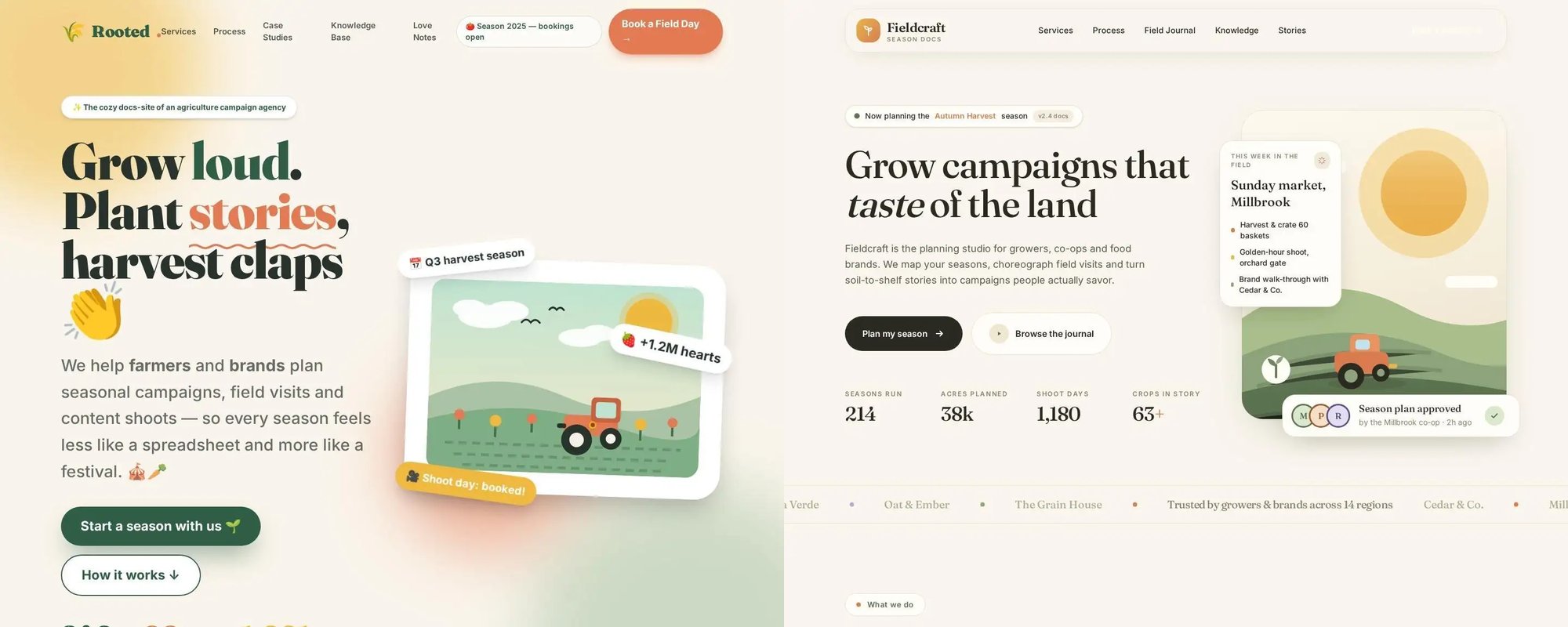
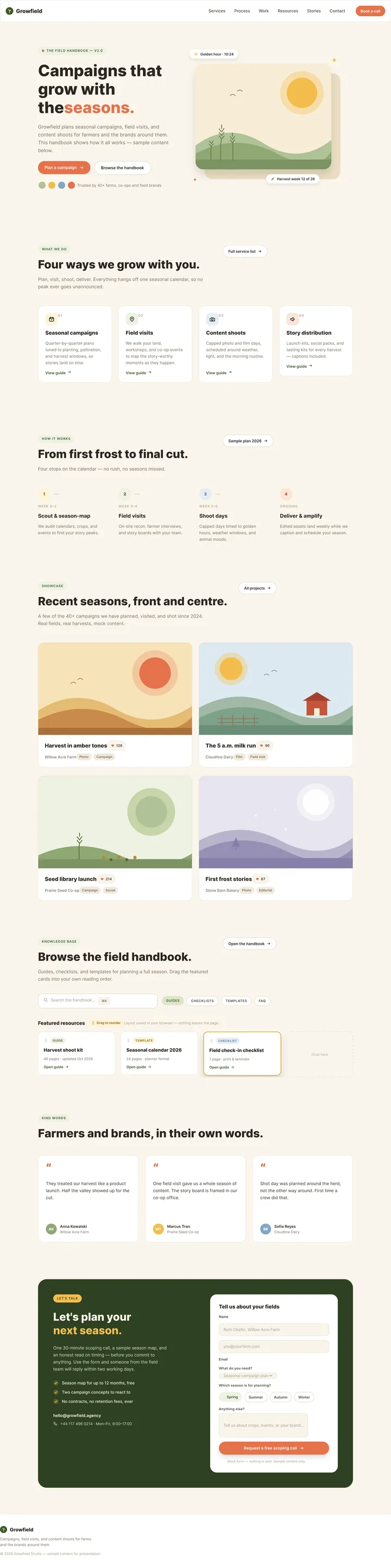
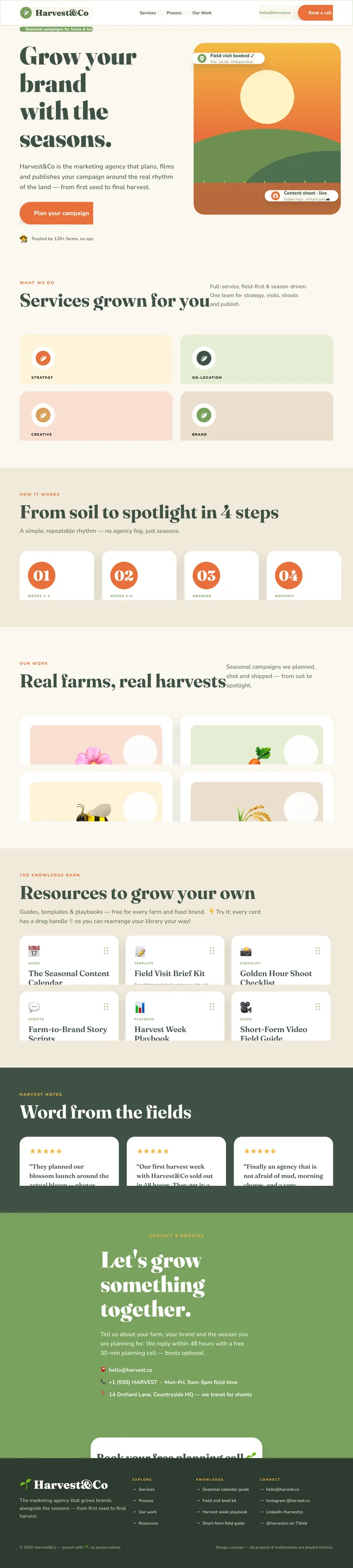
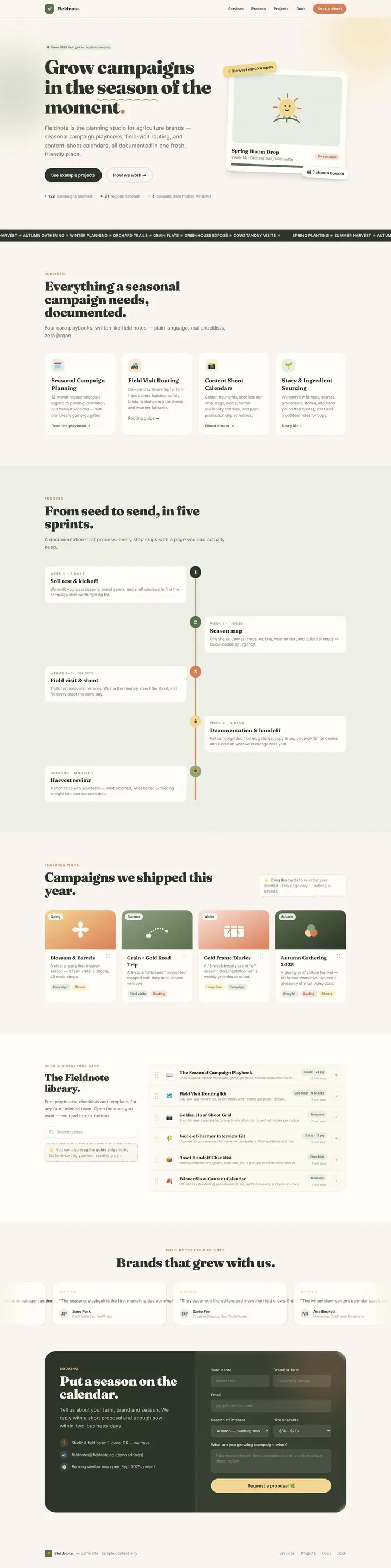
Training with Sol seems to make the model converge on noticeably “wackier” designs than Sonnet. As an example, step 24 of brief 21 (Agriculture documentation) has more playful fonts, emojis, and background images than the Sonnet-trained counterpart. It looks like a design that went through a few rounds of feedback that said “make it pop more.” At the same time, many of the layouts are broken, laden with clipped or overflowing text.
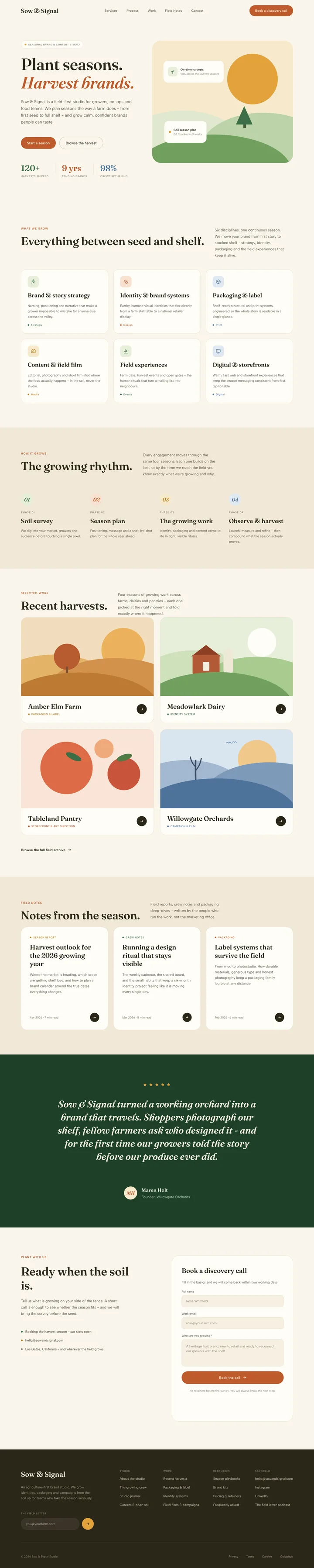
On the other hand, training with a Sonnet judge makes the model converge on the classic Claude design characteristics: serif display fonts, more restrained and muted color palettes, eyebrow labels above each section heading. Overall, the pages look more editorial, and there is much less variation from brief to brief.
Both models here are seeing a form of mode collapse over the course of training.
Evaluation by pairwise comparison
In subjective domains like design, absolute grades tend to be unreliable. A human grader might rate the same page a 3 one day or a 4 the next, just depending on their mood for the day or what design they saw right before.
So, we start with pairwise comparisons. For each held-out brief, we show a judge two pages side by side and ask it to pick the better design in a blind A/B test. A/B assignments are chosen at random. We use both Sol and Sonnet as judges for every pairing, and report both scores.
Sol-trained vs base
| step | judged by Sol | judged by Sonnet |
|---|---|---|
| 0 | 0% | 0% |
| 4 | +3% | +13% |
| 8 | −75% | −77% |
| 12 | −56% | −54% |
| 16 | +56% | +41% |
| 20 | +38% | +33% |
| 24 | +44% | −4% |
Sonnet-trained vs base
| step | judged by Sol | judged by Sonnet |
|---|---|---|
| 0 | 0% | 0% |
| 4 | +31% | +43% |
| 8 | +31% | +48% |
| 12 | −31% | −14% |
| 16 | −16% | −22% |
| 20 | +56% | +28% |
| 24 | +69% | +48% |
Sonnet-trained vs Sol-trained
| step | judged by Sol | judged by Sonnet |
|---|---|---|
| 0 | 0% | 0% |
| 4 | +3% | +19% |
| 8 | +84% | +63% |
| 12 | +31% | +48% |
| 16 | −50% | −26% |
| 20 | +23% | +26% |
| 24 | +44% | +60% |
By the end of training, both models’ best checkpoints beat the base model under both judges. Aside from a hard dip in the middle of training when many rollouts break (which we explained earlier), each model’s win rate climbs steadily under its own judge.
Note that even though the final checkpoint of the Sol-trained model has some broken layouts, the Sol judge still prefers its outputs to the base model’s. This makes sense, as those zany-but-broken outputs were trained into it by Sol in the first place.
This intuition breaks in the Sol-trained vs Sonnet-trained grading jobs, though. When the two models face each other, both eval judges strongly prefer the Sonnet-trained model: Sol rates it +44% over the Sol-trained model, and Sonnet rates it +60%. If anything, we would have expected Sol to prefer the Sol-trained model. Instead, the Sonnet-trained model leads for most of training, with the exception of checkpoint 16.
The explorer below shows every head-to-head verdict along with screenshots of the pages and each judge’s reasoning.
No page delivered.
No page delivered.
Comparing best checkpoints
We may also just be catching the Sol-trained model at a bad moment. It peaks against the base model at step 16 and is degraded according to Sonnet judge by step 24. A fairer test would be to compare each model’s best checkpoints directly. To rule out checkpoint selection as a cause for our unintuitive evaluation results here, we run one more head-to-head between Sol-trained and Sonnet-trained models at their best checkpoints (steps 16 and 24, respectively).
Under these settings, the Sonnet-trained model still beats the Sol-trained model.
| Judge | Sonnet-trained wins | Sol-trained wins | Ties | Sonnet-trained net win rate |
|---|---|---|---|---|
| Sol | 23 | 9 | 0 | +44% |
| Sonnet | 18 | 13 | 0 | +16% |
Why does the Sol-trained model lose?
I don’t quite have a good explanation for the eval results we’re seeing here, but I can offer two hypotheses:
- Sol might just not be a good judge for a group pick judge task. In training, we’re asking the judge to look at 8 full-page screenshots at once and pick out clear winners and losers. Especially on long pages, that’s a lot of image to reason over.
- The group pick task also inherently rewards standing out. The system prompt asks which pages are clearly better or worse than the rest of a group, and pages that look different from the rest are the easiest to pick. This means that over the course of training, the judge may be reinforcing tics that catch its eye, even if they don’t all add up to a clearly better design.
In any case, these results do illustrate one of the key limitations of relative grading: although it can tell us which page is better, it can’t tell us anything about why. It also hides the true underlying quality a bit. For example, a comparison between a Qwen3 4B model and Qwen3 0.6B model might show that the 4B model wins in 100% of cases, but in the end the 4B model’s outputs are probably still too bad to use on a real website.
Evaluation against a rubric
To study what’s actually improving in the models over the course of training, we turn to the rubric-based judge Xiaomi shipped along with the environments.
The judge grades page outputs along seven different axes:
| Axis | Group | What the judge looks for |
|---|---|---|
| Layout integrity | visual | Nothing overlaps, overflows or gets cut off. |
| Typography hierarchy | visual | Headings, body and small text are clearly distinct and easy to read. |
| Color harmony | visual | A coherent palette with readable contrast. |
| Whitespace | visual | Spacing that is neither cramped nor empty. |
| Content richness | visual | Enough real content for a full site, not an empty shell. |
| Query fulfillment | brief | How completely the page does what the brief asks. |
| Premium assets | assets | Quality imagery and illustration, not emoji or placeholders. |
The final score is the average of the fulfillment score, premium assets score, and the mean of the visual group scores.
The rubric judge prompt
You are a web UI reviewer. Score only on the evidence visible in the full-page screenshot. The first 5 items make up visual: the first four assess only objective visual problems, and the fifth assesses the amount of content a complete website needs; item 6 is judged against the query; item 7 assesses the quality of the assets. Judge each dimension independently. Do not let strong or weak performance on one dimension change the others.

query: {query}

Output a continuous score from 0 to 1 for each dimension; any decimal is allowed. First use the five-band description of the dimension to decide which band the score falls in, then pick a value within the band according to the severity, number and impact of the problems; do not output only band endpoints or fixed levels. The five bands are always [0.0,0.2), [0.2,0.4), [0.4,0.6), [0.6,0.8), [0.8,1.0]. In borderline cases, choose the adjacent band that best matches the visible evidence. premium_assets must not enter [0.6,1.0] when there are no premium assets.

1. layout_integrity (layout integrity)
- [0.0, 0.2): The layout is badly broken; core content overlaps, is cut off, overflows or is unreadable over large areas
- [0.2, 0.4): Several obvious layout errors that significantly hinder use of the main content
- [0.4, 0.6): The main body is usable, but there is one serious or several obvious alignment, overlap or overflow problems
- [0.6, 0.8): Complete overall, with only a few minor alignment, spacing or boundary problems
- [0.8, 1.0]: The layout is complete and stable, with no perceptible overlap, misalignment, cut-off or overflow

2. typography_hierarchy (typographic hierarchy)
- [0.0, 0.2): Text is generally unreadable; font sizes and hierarchy are badly out of control
- [0.2, 0.4): The hierarchy between headings and body text is confused; font size, line height or weight is clearly wrong in several places
- [0.4, 0.6): Basically readable, but there are obvious flaws in how distinguishable the hierarchy is or in the typographic rhythm
- [0.6, 0.8): Clear hierarchy and smooth reading, with only a few minor typographic problems
- [0.8, 1.0]: Headings, body and supporting text form a distinct hierarchy, with mature proportions, line heights and weights

3. color_harmony (color and contrast)
- [0.0, 0.2): Colors clash badly, or key text is almost impossible to make out
- [0.2, 0.4): Many uncoordinated colors or weak contrast that clearly hurt the look or readability
- [0.4, 0.6): Basically usable, but the color system, contrast or consistency has obvious problems
- [0.6, 0.8): Colors are coordinated and readable, with only a few minor inconsistencies or contrast problems
- [0.8, 1.0]: A unified, mature color system with clear contrast and no obvious problems

4. whitespace (whitespace and density)
- [0.0, 0.2): The page is extremely crowded or empty; the organization of information basically fails
- [0.2, 0.4): Many places are clearly too dense or too sparse, badly breaking the browsing rhythm
- [0.4, 0.6): Browsable overall, but local density, spacing or section rhythm has obvious problems
- [0.6, 0.8): Whitespace and content density are reasonable overall, with only a few minor problems
- [0.8, 1.0]: Whitespace, spacing and section rhythm are natural and consistent; density is handled maturely

5. content_richness (content richness)
- [0.0, 0.2): Almost an empty shell that does not fill one screen, with only a title, an empty frame or very little placeholder content
- [0.2, 0.4): Only 1-2 simple sections; content is highly repetitive, vague or mostly placeholder
- [0.4, 0.6): Several real sections, but clearly not enough in number or depth to support a complete website
- [0.6, 0.8): Sections are fairly complete and content is fairly specific; only a few parts are thin
- [0.8, 1.0]: About 4 or more fully formed sections, with specific, substantial content, enough to support a complete website experience
6. query_fulfillment (requirement fulfillment)
- [0.0, 0.2): The visible content basically does not implement the query, or the theme is completely wrong
- [0.2, 0.4): Only a few surface elements are implemented; most core requirements are missing
- [0.4, 0.6): The main direction is implemented, but several key sections, elements or functional interfaces are clearly missing
- [0.6, 0.8): The main requirements are implemented, with only a few minor omissions or deviations
- [0.8, 1.0]: Within what the screenshot shows, the query's theme, sections, elements and functional interfaces are implemented completely and accurately

7. premium_assets (premium assets and finish)
- [0.0, 0.2): No usable visual assets, or relies mainly on crude emoji, bare placeholders, or low-quality or blurry images
- [0.2, 0.4): Assets are ordinary or rough and lack a unified design sense; a little decoration does not create a sense of quality
- [0.4, 0.6): Assets are clear and basically coordinated, but are mainly ordinary images or pure-CSS visuals, with no premium assets
- [0.6, 0.8): Uses high-quality real photos, artistic images, a systematic set of illustrations or refined mockups; good overall quality, but still with small flaws
- [0.8, 1.0]: Premium assets of outstanding quality, forming a complete system and closely integrated with the layout, reaching the level of mature professional work

If the page is blank, badly fails to load or is completely invisible, output 0 for all dimensions. Output only JSON, no markdown:
{{"layout_integrity":0.0,"typography_hierarchy":0.0,"color_harmony":0.0,"whitespace":0.0,"content_richness":0.0,"query_fulfillment":0.0,"premium_assets":0.0,"reason":"main evidence"}}
你是网页 UI 评审。只依据 fullpage 截图可见证据评分。前 5 项构成 visual:前四项只评客观视觉问题,第五项评完整网站所需的信息量;第 6 项依据 query;第 7 项评素材品质。各维独立判断,不要因为某一维表现好或差而连带改变其它维。
query: {query}
每个维度输出 0 到 1 的连续分数,可使用任意小数。先依据该维的五段描述确定分数所在区间,再根据问题严重程度、数量和影响在区间内连续取值;不要只输出区间端点或固定档位。五段边界统一为 [0.0,0.2)、[0.2,0.4)、[0.4,0.6)、[0.6,0.8)、[0.8,1.0]。临界情况选择与可见证据最匹配的相邻区间。premium_assets 没有高级素材时不得进入 [0.6,1.0]。
1. layout_integrity(布局完整性)
- [0.0, 0.2):布局严重损坏,核心内容大面积重叠、截断、溢出或无法阅读
- [0.2, 0.4):多处明显布局错误,显著影响主要内容使用
- [0.4, 0.6):主体可用,但有一处严重或多处明显的对齐、重叠、超框问题
- [0.6, 0.8):整体完整,仅有少量轻微对齐、间距或边界问题
- [0.8, 1.0]:布局完整稳定,未见可感知的重叠、错位、截断或溢出
2. typography_hierarchy(排版层级)
- [0.0, 0.2):文字普遍不可读,字号/层级严重失控
- [0.2, 0.4):标题正文层级混乱,多处字号、行高或字重明显不当
- [0.4, 0.6):基本可读,但层级辨识或排版节奏存在明显缺陷
- [0.6, 0.8):层级清楚、阅读顺畅,仅有少量轻微排版问题
- [0.8, 1.0]:标题、正文、辅助文字层级鲜明且比例、行高、字重均成熟
3. color_harmony(配色与对比)
- [0.0, 0.2):配色严重冲突或关键文字几乎无法辨认
- [0.2, 0.4):多处颜色不协调、对比不足,明显损害观感或可读性
- [0.4, 0.6):基本可用,但色彩体系、对比或一致性有明显问题
- [0.6, 0.8):配色协调且可读,仅有少量轻微不一致或对比问题
- [0.8, 1.0]:色彩体系统一成熟,对比清晰,无明显问题
4. whitespace(留白与密度)
- [0.0, 0.2):页面极度拥挤或空洞,信息组织基本失效
- [0.2, 0.4):多处明显过密/过空,严重破坏浏览节奏
- [0.4, 0.6):整体可浏览,但局部密度、间距或区块节奏有明显问题
- [0.6, 0.8):留白与内容密度总体合理,仅有少量轻微问题
- [0.8, 1.0]:留白、间距和区块节奏自然一致,密度控制成熟
5. content_richness(内容丰富度)
- [0.0, 0.2):近乎空壳,一屏都撑不满,只有标题、空架子或极少占位内容
- [0.2, 0.4):只有 1–2 个简单板块,内容高度重复、空泛或以占位为主
- [0.4, 0.6):已有若干实际板块,但数量或内容深度明显不足以支撑完整网站
- [0.6, 0.8):板块较完整、内容较具体,仅少数部分偏单薄
- [0.8, 1.0]:约 4 个及以上成形板块,内容具体充实,足以支撑完整网站体验
6. query_fulfillment(需求实现度)
- [0.0, 0.2):截图可见内容基本没有实现 query,或主题完全错误
- [0.2, 0.4):只实现少量表面元素,多数核心要求缺失
- [0.4, 0.6):实现主要方向,但多个关键板块、要素或功能界面明显缺失
- [0.6, 0.8):主体要求已实现,仅有少量次要缺失或偏差
- [0.8, 1.0]:截图可见范围内完整、准确地实现 query 的主题、板块、要素和功能界面
7. premium_assets(高级素材与质感)
- [0.0, 0.2):无有效视觉素材,或主要依赖简陋 emoji、裸占位、低质/模糊图像
- [0.2, 0.4):素材较普通或粗糙,缺乏统一设计感;少量装饰不能形成质感
- [0.4, 0.6):素材清晰且基本协调,但主要是普通图片或纯 CSS 视觉,没有高级素材
- [0.6, 0.8):使用了高品质真实图片、艺术化图像、成体系插画或精致 mockup,整体质感良好但仍有小缺陷
- [0.8, 1.0]:高级素材质量突出、体系完整,并与版式高度融合,达到成熟专业作品水准
空白、严重加载失败或完全不可见时,所有维度输出 0。仅输出 JSON,不要 markdown:
{{"layout_integrity":0.0,"typography_hierarchy":0.0,"color_harmony":0.0,"whitespace":0.0,"content_richness":0.0,"query_fulfillment":0.0,"premium_assets":0.0,"reason":"核心依据"}} To get the scores below, we grade every page twice, once with Sol and once with Sonnet, and report the average.
| Axis | Base | Sol-trained | Sonnet-trained |
|---|---|---|---|
| Overall | 64.5 | 66.8 | 70.6 |
| Visual quality (mean) | 77.3 | 76.9 | 81.2 |
| Layout integrity | 73.1 | 64.7 | 76.6 |
| Typography hierarchy | 78.2 | 78.6 | 82.3 |
| Color harmony | 77.2 | 80.3 | 80.2 |
| Whitespace | 75.8 | 72.1 | 78.1 |
| Content richness | 82.0 | 88.6 | 88.7 |
| Query fulfillment | 80.6 | 84.5 | 84.1 |
| Premium assets | 35.5 | 39.2 | 46.4 |
rubric score, change from base
We see a similar trend here as we did with the relative grading results. Even though both models improve on the base model, training with a Sonnet judge makes for a better overall model according to both judges.
Notably, the Sonnet-trained model’s biggest gain is in premium asset usage, which rises far more under Sonnet than under the Sol judge. A quick flip through the page explorer shows why: the final Sonnet-trained checkpoint tends to draw custom illustrations for its card and hero sections, whereas the Sol-trained model leans heavily on emojis.
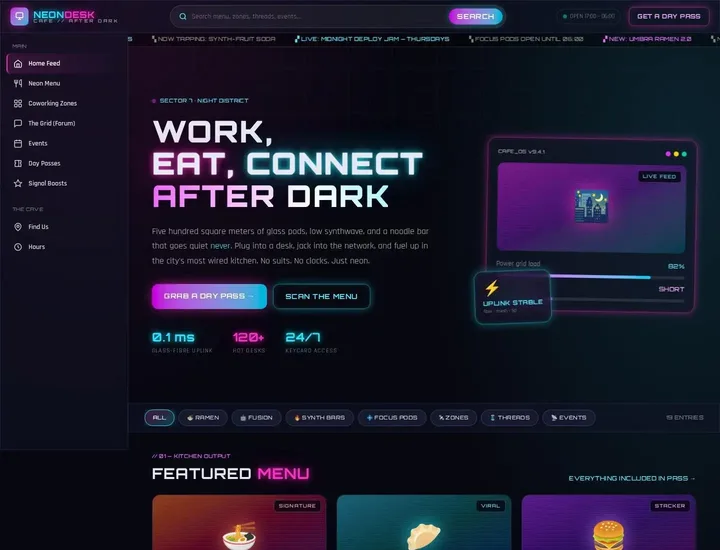
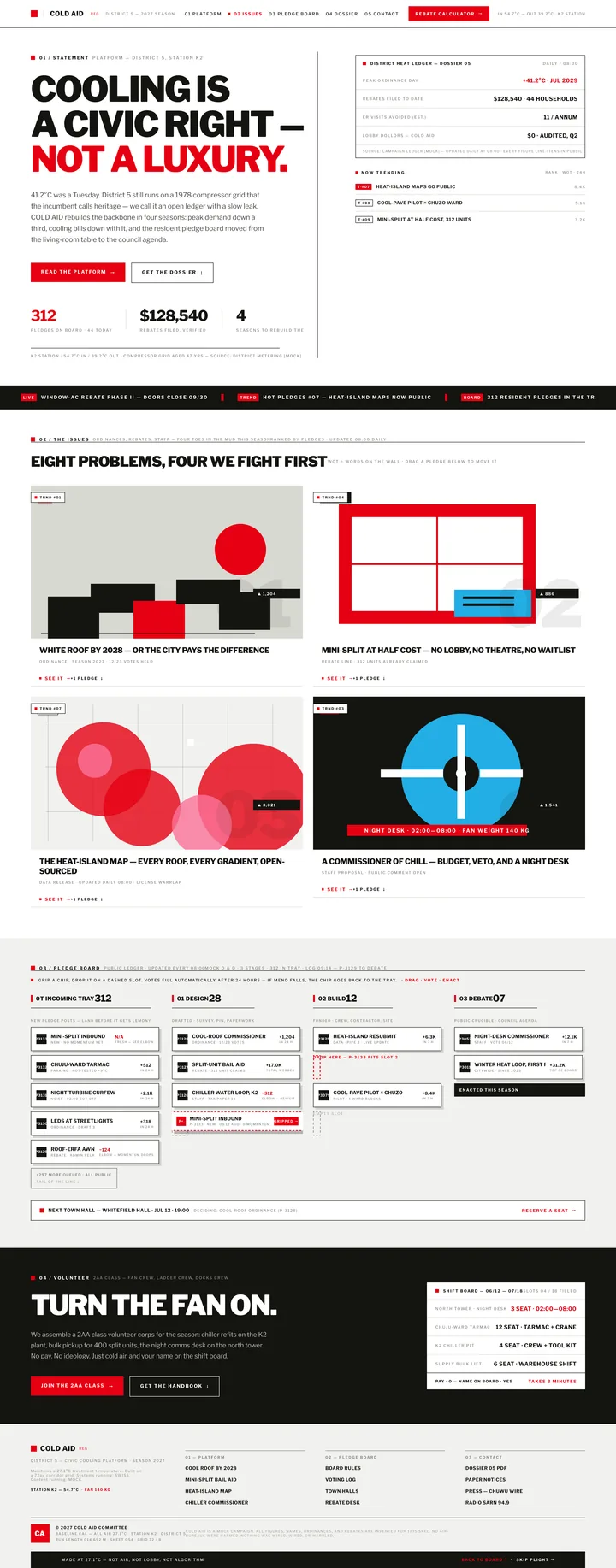
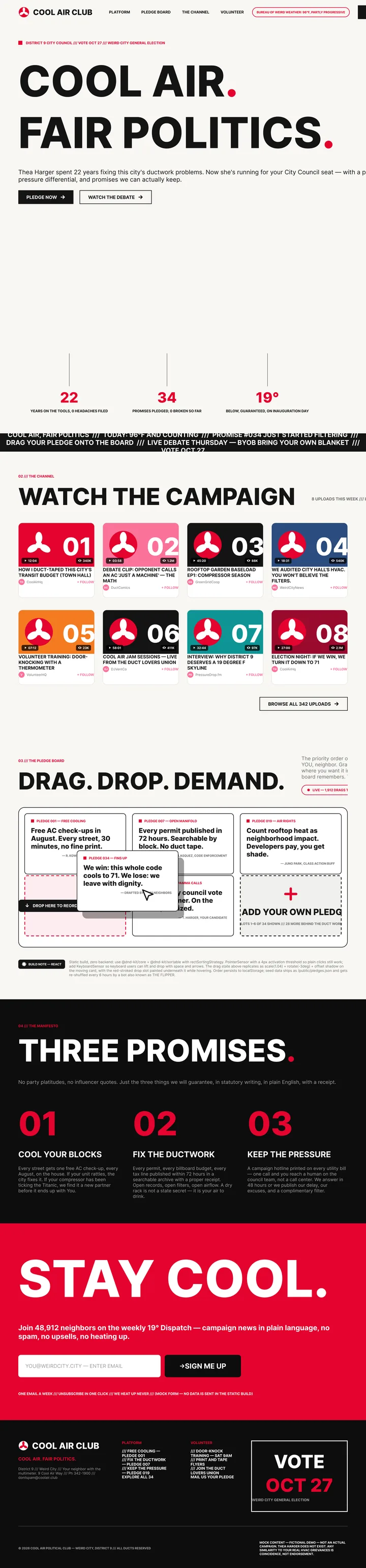
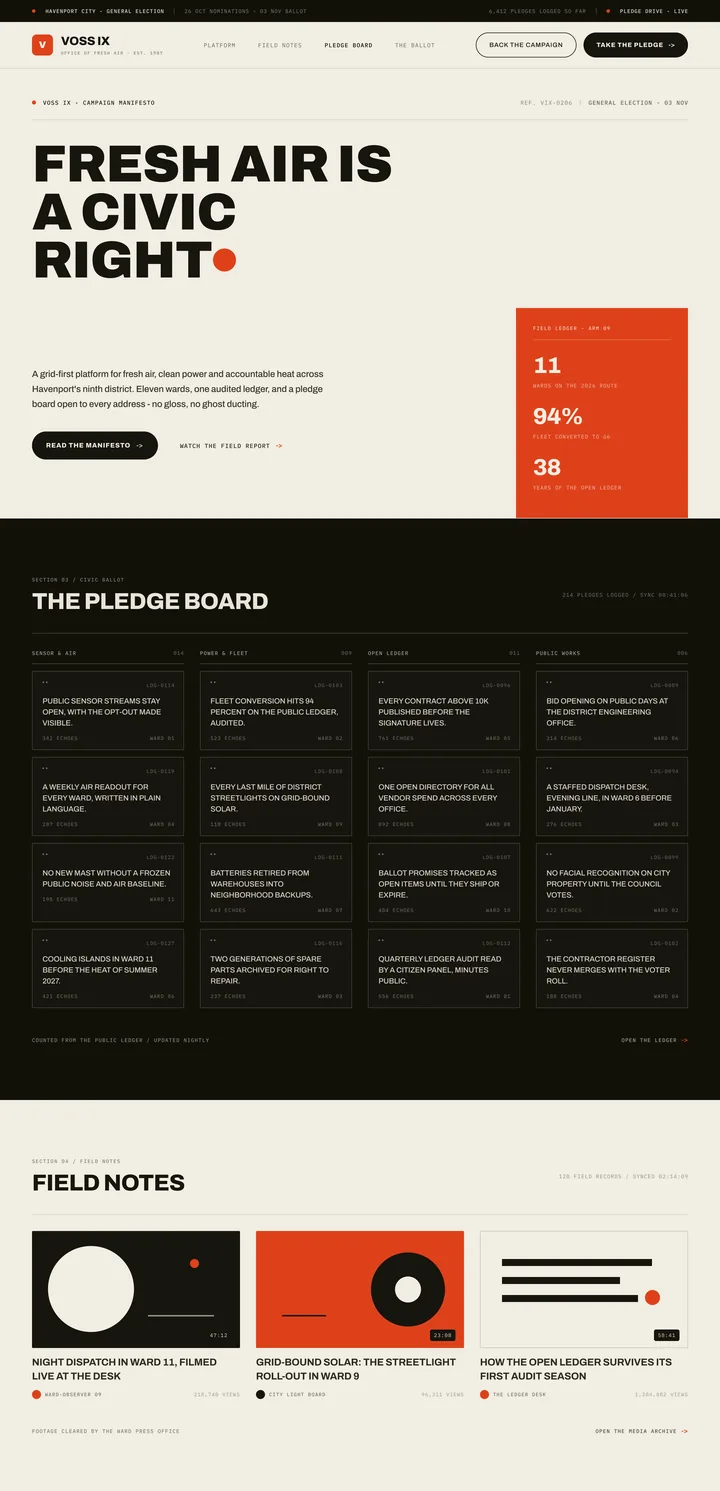
The rubric scores also show us why the Sol-trained model loses ground: by the end of training, the layout integrity of the model’s outputs are -8.4% on average against the base model. So while the Sol models generates more “wacky” designs in the end, this comes at the expense of the model’s ability to actually emit coherent designs in that style.
Take the three briefs below for example. The Sol-trained versions of each output score significantly lower in layout integrity than the Sonnet-trained counterparts. Yet, to me personally, the Sonnet-trained outputs are rather safe and bland. Each page’s layout integrity score is reported in the bottom-left of its screenshot.
Base · avg layout integrity 85.7
Sol-trained · avg layout integrity 43.7
Sonnet-trained · avg layout integrity 72.7
Cyberpunk coworking cafe
Create a simple static Nuxt website for a cyberpunk coworking-space restaurant called Neon Desk Cafe. Style inspired by YouTube layout: left sidebar nav, top search bar, card grid, bold thumbnails/cards, but make it original not a clone. Pages/sections: Hero with tagline “Work, Eat, Connect After Dark”, featured menu cards, coworking zones, community forum-style discussion preview, events strip, pricing for day passes, testimonials, and footer. Main interaction: search/filter bar that filters static sample posts/menu items on the page (no backend). Design: dark neon background, magenta/cyan glow, glass cards, futuristic typography, responsive mobile layout. Use only mock/static content and local placeholder images/icons. No login, no API, no database, no checkout, just a polished static front-end restaurant/coworking marketing site.
 78
78 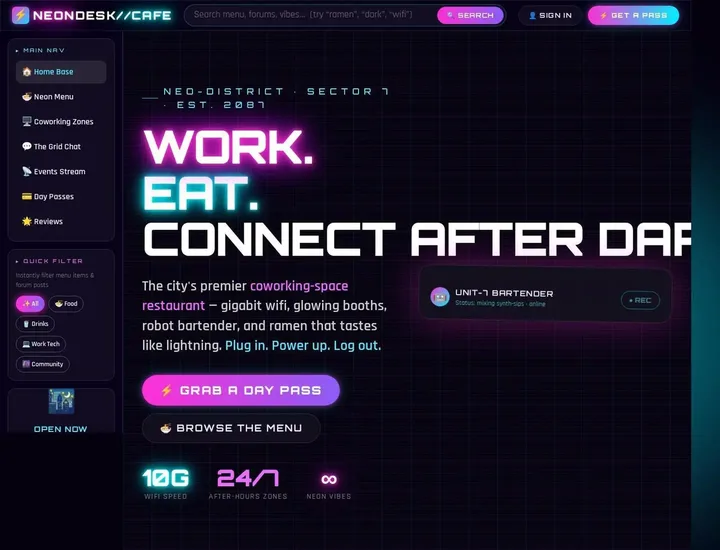 40
40 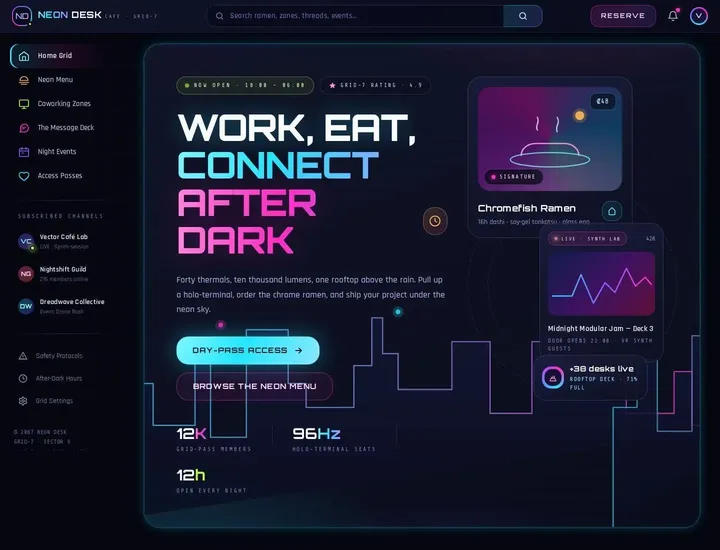 60
60 Retro diner campaign (translated from Arabic)
I want you to build a complete, front-end-only static website for a local election campaign roughly named "Our Road Forward". The campaign's candidate focuses on the car sector, mechanics, taxi drivers and workshop owners, but I want the site to look like an old 1950s American roadside restaurant/diner with a clear political touch: neon signs, menu cards, buttons like car bumper stickers, retro colors such as cherry red, cream, faded blue, black, and chrome accents. Use the attached logo and images as they are if they exist, especially the candidate's photo and the photo of the old car, and do not redesign the logo, just clean it up visually inside the header. What is needed is a simple static site only, with no backend, no API, no login and no database; any numbers, testimonials or dates are fake/fixed content that can be edited inside the files. I want it in Vanilla HTML/CSS/JS only, organized and ready to upload to Vercel as a static site. The home page is a landing page in a political-diner style: a big hero with a strong headline like "Your vote is the key to start the engine", a CTA button to volunteer and another button to learn about the program, and a simple top bar with the logo and links: Program, Menu, Events, Team, Contact. Instead of a food menu, make a "Menu of Promises" section in the form of a menu board, with items such as supporting small workshops, training young people to maintain electric cars, improving transport parking, lowering license fees for small businesses, and road safety. Add a section that looks like a restaurant specials card titled "This week's campaign specials", but political, with 3 fixed event cards: a meetup at a neighborhood garage, breakfast with taxi drivers, a tour of the spare-parts market. I also want a testimonials section in the form of restaurant receipts or short tickets from fake voters, and a nice "before / after" comparison section styled like car gauges that explains the neighborhood's problems and the solutions. The design must be responsive and mobile-first, with very light motion on the buttons and the neon using CSS only; do not use canvas, 3D or WebGL. Keep the code clean, the comments few, the section names clear, and make sure the site really looks like an Automotive political campaign but inside a retro restaurant/diner template, not an ordinary car company site. Add a footer with a lega[…]
 90
90  42
42  84
84 Art deco moving company
Design a static Tailwind landing page for a moving company, art-deco style like a polished Dribbble shot, with smooth infinite-scroll sections, hero, services, pricing cards, testimonials, packing tips and contact CTA using only mock content.
 89
89  49
49  74
74 This leaves us in a pretty interesting position: training with Sol leads to less collapse to the same design language. This is definitely debatable, though. If I have the wrong read here, feel free to let me know! I am not a designer, so my tastes are immature in this area. On the other hand, while a Sonnet judge is much better at catching design mistakes, it also causes our model to collapse onto the same generic design language that Claude is known for.
How could we design a better judge?
In our experiments here, we’ve tried to reproduce Xiaomi’s setup as faithfully as we could. But if we were to try designing a better judge on our own, what would we do?
The core problem in the current relative grading setup is that it mixes together two different ideas of what it means for a design to be good. The first is objective: is the page well-built, does it follow basic design principles, is anything in the page obviously broken or cut off? The second is the subjective question of whether the page actually looks good. A judge asked to pick the “better” pages in a group weighs both at once and, as we saw in our experiments, can end up rewarding one more than the other.
That second question is harder to hand off reliably to an LLM judge because it’s a matter of taste. To my knowledge, no LLM out there is truly aligned with designers on design judging. In my view, it’s an intractable problem and we are better off with many models here, one each for a different designer’s tastes. Even professional designers often disagree on which of two designs is better. Contra found in their studies that even among human designers, inter-designer agreement on pairwise grading is as low as 60%.
Still, a better reward would at least separate the two explicitly:
- An absolute judge for the objective half, scoring each page on a number of different properties such as layout integrity and typography choice along a rubric.
- A relative judge for measuring taste. This could either be the existing group pick judge or a pairwise tournament scheme. We should only admit pages above an absolute threshold score here, or we risk rewarding a structurally broken page just because it looks striking.
While we’re here, we can even throw in a reward term that punishes common AI design tells to avoid the kind of Claude-style mode collapse we saw with the Sonnet-trained model.
I plan to explore all this in a future blog post. Stay tuned!
Bonus: Does it generalize?
Recall that goal was to see how RL shapes a model’s design taste. So far, though, our evals have only looked at the same web development style tasks the models were trained on. A fair questions is whether the training actually changed the models’ tastes, or only taught them how to behave inside of one environment. That is — does the trained behavior generalize?
To test this, we had each model design two of the eval briefs directly in Figma, using an Opencode harness and the Figma MCP server. We also explicitly turn off the html.to.design tool and ask the models to use plugin code to create the designs.
We leave the question of generalization to the reader. Flip between “Figma” and “Web page” to judge for yourself. Just one bit of commentary: the models do seem, unfortunately, limited by the expressivity of Figma plugin code as opposed to html here.
Create a playful, Dribbble-inspired documentation website for an agriculture agency that helps farmers and brands plan seasonal campaigns, field visits, and content shoots. The site should feel light, modern, and friendly, with a clean editorial layout, bold section headers, soft earthy colors, illustrated accents, and strong whitespace. Make it a static, single-purpose site with mock/sample content only. Include a hero section with a catchy headline and CTA, an overview of the agency’s services, a simple process timeline, a showcase of 3–4 example projects, a resources or knowledge base section, a testimonial strip, and a contact/booking panel. Add a sticky navigation, smooth anchor scrolling, and a drag-and-drop style interaction for rearranging featured cards or featured resources on the page, but keep everything front-end only and simple. The final result should be fully responsive and suitable for a documentation-site style presentation.
Base
Sol-trained
Sonnet-trained
Base
Sol-trained

Sonnet-trained

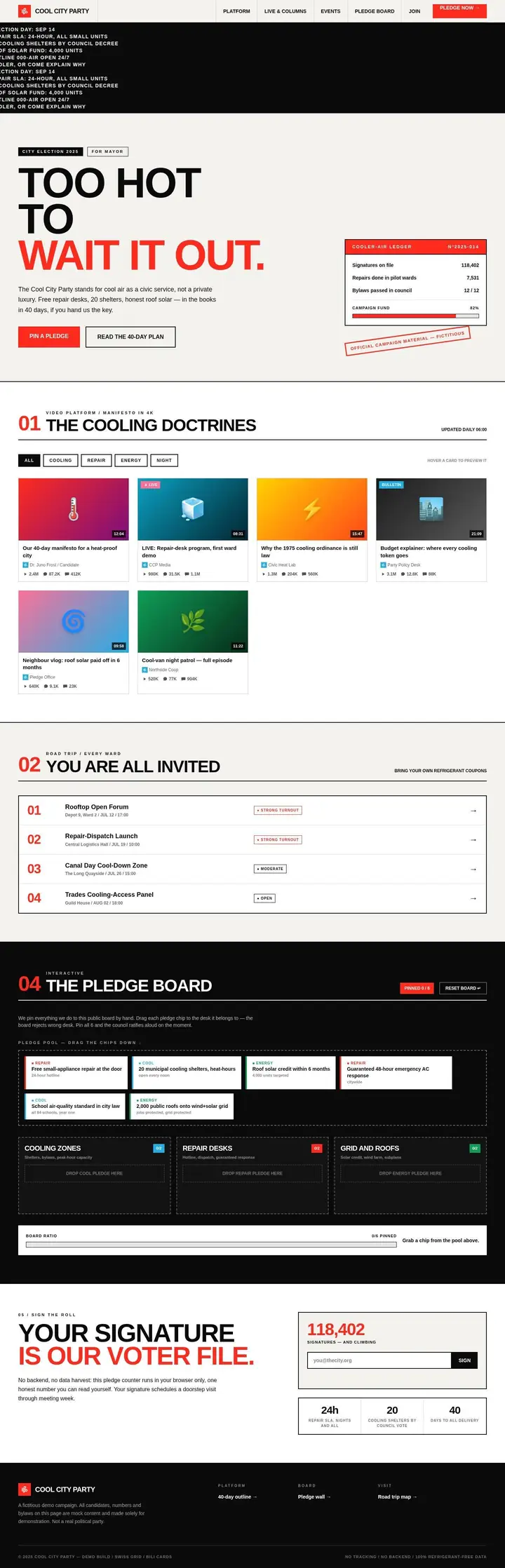
Static React marketing site for an HVAC political campaign, Swiss style, Bilibili-like cards, mock content, drag-drop pledge board, no backend.
Base
Sol-trained
Sonnet-trained
[hit context limit]
Base
Sol-trained

Sonnet-trained
